
 evice has a passcode
set!If a passcode is set,the jailbreak procedure will most likely fail.Unplug device, go to Settings and
DISABLE THE PASSCODE,then plug it back in. 請各位大大救命,感謝!!!


使用Absinthe要開始jb時,打開視窗在Plug in your iDevice to begin.的這個地方出現ERROR
set!If a passcode is set,the jailbreak procedure will most likely fail.Unplug device, go to Settings and
DISABLE THE PASSCODE,then plug it back in. 請各位大大救命,感謝!!!
手機有沒有設鎖定密碼?
關掉它吧
先去把密碼關掉之後就ok了
謝謝大大的解答,不過我去掉密碼之後…又出現別的訊息~"~
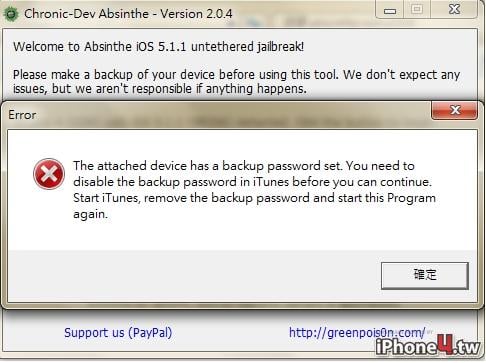
作者: eric0224

一樣是密碼…備份密碼要關掉
Sent from my iPhone
謝謝大大的回覆,不過我還是有不懂的地方就是…備份密碼我不知道在那裡關掉…,請大大救救我>"<
按到唉鳳一插下去 摘要 那裡
有備份那邊有兩個選項 icloud 跟電腦備份
電腦備份下面還有一個選項 是否加密 那裡取消就好了
密馬你要知道
這裡
Sent from my iPhone
謝謝各位大大的幫忙,已經可以jb了,謝謝
USAGE: (MacOSX, Windows & Linux)
1. Make a backup of your device iTunes by right clicking on your device name under the 'Devices' menu and click 'Back Up'.
2. Once your backup is complete return to your device and go to Settings - General - Reset - Erase All Content and Settings. This will make the jailbreak process much faster.
3. Open Absinthe and be sure your are still connected via USB cable to your computer.
4. Click 'Jailbreak' and wait... just be patient and do not disconnect your device!
5. Once jailbroken return to iTunes and restore your backup from earlier. To do so, right click on your device name under the 'Devices' menu in the left panel of iTunes and click 'Restore From Backup...' then select the latest backup you created before. (restoring this backup will return all the content previously on your device, i.e. apps, photos, etc.)
6. Thanks for using Absinthe, enjoy your jailbroken iDevice!
重置所有內容跟設定 大約5分就JB玩了
 發文規則
廣 告
發文規則
廣 告



