
Safari無預警崩潰修正
Safari瀏覽速度增加大約2倍左右
打字增快 不會遲緩了^_^
以下為修正清單:
代碼:
Here are the release notes:

The following issues relate to using the 5.0 SDK to develop code.

Accounts
When creating an iCloud account, you can use any Apple ID as long as it is a full email address and not a MobileMe account. If you have a MobileMe account, you can move that account to iCloud. You can find more information on iCloud at: http://developer.apple.com/icloud
FIXED: When setting up an iCloud or MobileMe account using the setup assistant and leaving Find My iPhone on, it might actually turn Find my iPhone off after the setup. Please verify in Settings/Mail, Contacts, Calendar/YourAccount that Find my iPhone is toggled On after leaving the setup assistant.
FIXED: Enabling iCloud services in Setup Assistant may not always be saved correctly. After completing Setup Assistant you should visit Settings > iCloud to verify the state of the iCloud account. If you have multiple iCloud or MobileMe accounts configured on the device you should also visit each of those accounts in Settings > Mail, Contacts, Calendar to verify each account.
FIXED: It is recommended that you disable Bookmarks on multiple accounts. If they are enabled, the results might be undefined.
AirPlay
Starting in iOS 5, video content in applications and websites are AirPlay-enabled by default.
iOS 5 supports AirPlay of video via AV Foundation.
Apple TV
Apple TV Software beta enables users to mirror the contents of an iPad 2 to an Apple TV (2nd generation) using AirPlay. This beta software also enables Photo Stream on Apple TV so users can access photos stored in iCloud. Apple TV Software beta is being provided to test the latest AirPlay functionality with your iOS 5 apps and web sites. If you wish to install Apple TV Software beta on your device, you must first register your device UDID in the iOS Developer Program Portal.
Apple TV may return to the main menu when exiting a TV show played via Home Sharing.
Music playlists are inaccessible via Home Sharing.
Binary Compatibility
On applications linked against the iOS 5.0 SDK, scroll view content offsets will no longer be rounded to integral pixels during a pinch gesture.
Calendar
Birthday calendars are not currently available via the icloud.com website or in Windows. They will be available in a future release.
FIXED: The default calendar is still the On My iPhone calendar despite setting up an iCloud account during Setup Assistant. As a workaround, reset the default Calendar after finishing Setup Assistant in Settings > Mail, Contacts, Calendar > Default Calendar.
FIXED: Pushing iCloud Calendar data is not working in iOS. To sync your iCloud Calendar, launch the Calendar app or refresh the calendars manually using the Calendars button in the top left corner.
Core Image
Several filters have been added since beta 1. The current list now includes the following filters:
CIAdditionCompositing, CIAffineTransform, CICheckerboardGenerator, CIColorBlendMode, CIColorBurnBlendMode, CIColorControls, CIColorCube, CIColorDodgeBlendMode, CIColorInvert, CIColorMatrix, CIColorMonochrome, CIConstantColorGenerator, CICrop, CIDarkenBlendMode, CIDifferenceBlendMode, CIExclusionBlendMode, CIExposureAdjust, CIFalseColor, CIGammaAdjust, CIGaussianGradient, CIHardLightBlendMode, CIHighlightShadowAdjust, CIHueAdjust, CIHueBlendMode, CILightenBlendMode, CILinearGradient, CILuminosityBlendMode, CIMaximumCompositing, CIMinimumCompositing, CIMultiplyBlendMode, CIMultiplyCompositing, CIOverlayBlendMode, CIRadialGradient, CISaturationBlendMode, CIScreenBlendMode, CISepiaTone, CISoftLightBlendMode, CISourceAtopCompositing, CISourceInCompositing, CISourceOutCompositing, CISourceOverCompositing, CIStraightenFilter, CIStripesGenerator, CITemperatureAndTint, CIToneCurve, CIVibrance, CIVignette, and CIWhitePointAdjust

GameKit
Match data for turn based matches is currently limited to 4 KB of data.
NEW: Events will be passed to the delegate whenever a turn is made on a match, instead of just when it becomes the local player's turn.
FIXED: When logging in to Game Center, the password may clear and login may not complete. Trying a second time will succeed.
FIXED: In this beta, GameKit Invites may fail. As a workaround, try restarting the device.
iBooks
iBooks 1.2.2 may fail to display some text or images in books. Please update to iBooks 1.3 in the App Store.
iCloud Backup
As this is beta software, it is recommended that you do not use the iCloud services to store any critical data or information. If you enable iCloud Backup, automatic backup with iTunes when syncing will be disabled. We also suggest that you manually back up your device with iTunes. Backups made with earlier versions of iOS 5 beta will soon become incompatible, and will no longer be available. It is strongly advised you upgrade to this version of the iOS 5 beta in order to continue backing up your devices. If you encounter errors restoring from a backup, or enabling a backup more than one hour after signing into iCloud, try deleting your iCloud account from Settings and adding it back. If errors persist, please try erasing your device and initiating the restore again.
iCloud Storage
NEW: If you call either stringByResolvingSymlinksInPath or stringByStandardizingPath on a path descended from your container, you'll never be able to use the result to successfully perform a coordinated read.
NEW: On KVS, the per-key limit has been raised to 64Kb (to match the per-app limit); and the maximum number of keys has been raised to 256.
During the iOS 5 beta period, any documents stored on the servers might be purged periodically before GM. Therefore, it is highly recommended that you do not store any critical documents or information on the servers.
Provisioning Profiles no longer need to be enabled for iCloud in the iOS Provisioning Portal. All newly generated provisioning profiles are now automatically enabled for iCloud. If you are using an Xcode managed Team Provisioning Profile, click refresh in the Xcode Organizer to obtain a new iCloud-enabled profile. To enable all other provisioning profiles for iCloud, simply regenerate your profiles in the iOS Provisioning Portal.
If your application is using the NSMetadataQuery class, you must set a predicate, even though the predicate itself is ignored.
In this beta, the setSortDescriptors: method of NSMetadataQuery is not supported.
FIXED: To use iCloud prior to beta 5, you had to manually specify various container identifiers (your application’s Display set) within an Entitlements file for both of your Mac OS X and iOS projects.
Starting in beta 5, to enable iCloud storage within your apps, simply click the “Enable Entitlements” checkbox in the Summary pane of your project. Xcode will create a custom entitlements file for your project that automatically includes your Team ID. You can add additional iCloud Container values as required by your application. (Note that you must regenerate your existing provisioning profiles, either with Xcode or in the iOS Provisioning Portal, to use iCloud storage.)

If you specify a custom identifier string for your iCloud Key-Value Store or iCloud Container entitlement values, you no longer need to prepend your Team ID to the beginning of the string. Xcode will prepend your Team ID to these entries automatically

The container identifier string you pass to the URLForUbiquityContainerIdentifier: method of NSFileManager MUST include the team ID at the beginning of the string. As a convenience, if you pass nil, Foundation uses the first document container ID specified in your app’s entitlements.
There are issues using the Cloud Storage document API in conjunction with protected data which can lead to data corruption.
FIXED: In this beta, document-based applications cannot always detect when files change, move, or are deleted out from underneath them.
In this beta, file presenters (objects that adopt the NSFilePresenter protocol) do not receive some of the messages that they're supposed to receive, especially:
presentedItemDidChange
presentedSubitemDidAppearAtURL:
presentedSubitemDidChangeAtURL:
You can workaround this by implementing the relinquishPresentedItemToWriter: method and checking to see if the writer actually wrote when your file presenter reacquires. You can also use FSEvents to observe file system changes
In this beta, messages about changes to files in a directory are not getting delivered to objects that adopt the NSFilePresenter protocol.
While reporting a bug related to the iCloud storage interfaces, please include the logs collected during your debugging session. To generate these logs, you must install a special debug profile on your device.
The debug profile can be obtained from http://connect.apple.com. This profile enables the generation of debug logs that are needed to diagnose any problems using iCloud storage. The instructions to collect the logs are:

Install the profile. (The easiest way to do this is to mail it to yourself and open the attachment on their device.)
Reproduce the bug.
Sync with iTunes to pull the logs off your device.
Attach the logs to your bug report. You can find the logs in ~/Library/Logs/CrashReporter/MobileDevice/DeviceName/DiagnosticLogs.
These logs can grow large very quickly, so you should remove the profile after you have reproduced the problem and pulled the logs for the bug report.
File names are case-insensitive in OS X but case-sensitive in iOS. This can lead to problems when syncing files between the two. You should take steps on iOS to avoid creating files whose names differ only by case.
iMessage
iMessage beta 1 will be unable to communicate with iMessage users on beta 2 or later.
NEW:Setup Assistant does not input AppleID password in for FaceTime of iMessage.
interface Builder
NEW:The top-level views in a document that uses autolayout cannot have width and height constraints added. To workaround this you can add desired width or height constraint manually in code.
NEW:In Interface Builder documents using autolayout and constraints that Xcode generates cannot be deleted. You can "delete" these constraints by creating a user constraint for the behavior you are expecting. For example, if you drag out a button and Xcode generates a leading constraint to the button's superview, and you wanted a trailing edge to the superview constraint, creating one manually using "Add Constraint => Trailing Constraint to Superview" would remove the leading edge to superview constraint.
NEW:It is known that equal widths/heights constraints can be broken on views that fill a container when resizing the window. If you resize the window and a equal widths/height constraint is broken, re-adding it will properly adjust the window to accommodate the constraint.
NEW: When editing the value of a constraint in the inspector, the constraint remains selected, and the outline view continues to show the constraint as selected.
NEW:In XCode 4.2 when copying views (either a single view or multiple views), both the user defined constraints directly on the selected view and the user defined constraints between the views being copied are copied to the pasteboard.
NEW:In Xcode 4.2 for a document using Cocoa Auto Layout, "Select All" in the canvas no longer selects the constraints and subviews of the edited view. If a view is selected, it will only select views. If a constraint is selected, "Select All" will select all constraints.
NEW:Changing the segment style of an NSSegmentedControl to "Automatic" might crash in documents using Cocoa Auto Layout. To workaround the issue use an explicit segment style such as Round or Textured, and at runtime, change the segment style to automatic using -[NSSegmentedCell setSegmentStyle:]
iPod
FIXED: When using the volume buttons on the device, or on headphones, the volume slider in the UI of applications may not update even though the volume level has changed.
iTunes
The version of iTunes that comes with beta 5 cannot sync devices that have the beta 4 software installed. To avoid this problem, do the following:
Sync any devices that have beta 4 installed to the version of iTunes that came with beta 4.
Upgrade iTunes to the version that comes with beta 5.
Connect the device and install the beta 5 software. (Understand that you might see a failure to sync error when you first connect the device.)
After installing the beta 5 software, restore from your the backup you made in step 1.
Videos purchased from the iTunes Store do not play on a 2nd generation AppleTV over AirPlay with iTunes 10.5.
Mail
When changing the host name of an email account in settings, blank messages may be seen in the unified inbox. As a workaround, delete and re-add the account instead of changing its host name.
OTA Software Update
If you are doing an OTA software update, you will need to re-sync your photos with iTunes."
Photos
FIXED: When restoring photo libraries from an iTunes backup, some photos may not appear in the Photos application after restore. Please back up your photos before updating to iOS Beta 5.
Reminders
NEW: If reminders syncing is enabled for a Yahoo account and there is no reminders collection on the server, it will continually get recreated by the phone. Due to a Yahoo server bug, that collection will show up as an event calendar.
Simulator
Location services are not functional in iOS 4.3 simulator running on Mac OS 10.7 with Xcode 4.2.
Springboard
Push and local notifications for apps appear in the new Notification Center in iOS 5. Notification Center displays notifications that are considered "unread.” In order to accommodate push and local notifications that have no "unread" status, developers can use their application badge count to trigger a clearing of notifications from Notification Center. When an application clears its badge count (by setting it to zero), iOS 5 will clear its notifications from Notification Center.
FIXED: The UIPrerenderedIcon key (in the Info.plist file) is not honored in this beta.
StoreKit
FIXED: In-App purchase will not work for developers testing their apps with the iTunes Sandbox.
UI Automation
NEW: There is a known issue when using the performTaskOnHost API in a UI Automation script. If the task being performed with the API outputs excessively (say, thousands of lines of text) to standard out or standard error, the task may deadlock until the timeout is reached, at which point it will throw a javascript exception.
The lock() and unlock() functions of UIATarget have been replaced with the lockForDuration(<seconds>) function.
Starting in iOS 5 beta 2, you can now trigger the execution of an UI Automation script on an iOS device from the host terminal by using the instruments tool. The command is:
instruments -w <device id> -t <template> <application>
When using the cli instruments for UI Automation you can now target the default Automation Template and pass the script and results path into the tool as environment variable options. For example:
instruments -w <device id> -t /Developer/Platforms/iPhoneOS.platform/Developer/Library/Instruments/PlugIns/AutomationInstrument.bundle/Contents/Resources/Automation.tracetemplate <application> -e UIASCRIPT <script> -e UIARESULTSPATH <results path>
UIKit
Starting in iOS 5 beta 3, the exclusiveTouch property of UIControl has returned to its original default value of NO.
Returning nil from the tableView:viewForHeaderInSection: method (or its footer equivalent) is no longer sufficient to hide a header. You must override tableView:heightForHeaderInSection: and return 0.0 to hide a header.
In the iOS 5 beta, the UITableView class has two methods to move one cell from one row to another with defined parameters. These APIs are:
moveSection:toSection:
moveRowAtIndexPath:toIndexPath:
Using the UIWebView class in Interface Builder, setting transparent background color is possible in iOS 5. Developers compiling against the new SDK can check their XIB for the UIWebView transparent setting.
In the iOS 5 beta, the UINavigationBar, UIToolbar, and UITabBar implementations have changed so that the drawRect: method is not called on instances of these classes unless it is implemented in a subclass. Apps that have re-implemented drawRect: in a category on any of these classes will find that the drawRect: method isn't called. UIKit does link-checking to keep the method from being called in apps linked before iOS 5 but does not support this design on iOS 5 or later. Apps can either:
Use the customization API for bars that in iOS 5 and later, which is the preferred way.
Subclass UINavigationBar (or the other bar classes) and override drawRect: in the subclass.
The indexPathForRow:inSection:, section, and row methods of NSIndexPath now use NSInteger instead of NSUInteger, so that these types match with methods defined on UITableView.
Touch events are not getting forwarded to the view in the cameraOverlayView property of UIImagePickerController.
We have changed the behavior of scrollToRowAtIndexPath:atScrollPosition:animated: such that UITableViewScrollPositionTop and UITableViewScrollPositionBottom now adjust for the top and bottom portions of the contentInset property.
NEW: In releases prior to iOS 5.0, the UIPopoverController class would unconditionally set the autoresizing masks of view controllers which were the content view controller of the popover controller. It would also unconditionally set the autoresizing masks of the views of view controllers pushed on to a UINavigationController object which was the content view controller of the popover controller.
In iOS 5.0, the UIPopoverController class will no longer do this for applications linked on iOS 5.0 or later. Developers should ensure that the autoresizing masks of views are set properly to allow for arbitrary resizing within any container, not just popovers. A mask of (UIViewAutoresizingFlexibleWidth | UIViewAutoresizingFlexibleHeight) would not be unreasonable.

The completion handler for saveToURL:forSaveOperation:completionHandler: is now being called outside of the coordinated write block, where it used to be called inside.
NEW: The autosaveWithCompletionHandler: method is now called only for period-based saves and it is safe to return without saving. Documents must save, though, if the saveToURL:forSaveOperation:completionHandler: method is invoked.
Safari and WebKit
In iOS 5, a new inherited CSS property, -webkit-overflow-scrolling, is available. The value touch allows the web developer to opt in to native-style scrolling in an overflow:scroll element. The default value for this property is auto, which allows single-finger scrolling without momentum.
FIXED: In beta 5, accessing sites that use client side SSL certificates does not work and may cause the application to crash.
The WebKit framework has picked up a newer WebKit engine, which closely matches Safari 5.1. Some areas to be aware of with the new WebKit framework on iOS:
There is a new HTML5-compliant parser.
Text layout width may change slightly because word-rounding behavior now has floating-point-based precision.
There is improved validation of the <input type=number> form field, which includes removing leading zeros and number formatting.
Touch events are now supported on input fields.
window.onerror is now supported.
There is a new user agent that does not have locale information in the User Agent string.
FIXED: URLs are now canonicalized by making the scheme all lowercase. If a fake URL is used to pass information from a UIWebView back to native code, make sure that the scheme is always lowercase, or that the native code compares the scheme in a case-insensitive manner.
Wi-Fi Syncing
In iOS 5 beta 4 and later, wireless syncing is now available on Windows as well as the Mac. (This support requires OS X 10.6.8 or Lion.) You will see an option to enable wireless syncing when you connect your device to iTunes with the USB cable. It is recommended you perform your initial sync with a cable after restoring your device.
Wireless syncing is triggered automatically when the device is connected to power and on the same network as the paired computer. Or, you can manually trigger a sync from iTunes or from Settings > General > iTunes Sync (same network as paired computer required).
If you find issues with apps, media and/or photos synced to your device, you can reset then resync. From Settings > General > Reset, choose Erase all Content and Settings. Then reconnect to iTunes and sync again.
FIXED: In some cases, your device may fail to sync contacts, calendars and account settings, or back up to iTunes. If this happens, reboot your device and re-sync.
Xcode
In some cases, Xcode 4.2 Organizer does not display a device that is in restore mode. As a workaround you can use iTunes to restore.
In iOS 5 beta 5, iOS Simulator is not compatible with previous releases of the iCloud Developer Seed for OS X. It is highly recommended that you update to the latest iCloud Developer Seed to ensure compatibility.
iOS 5.0 SDK supports both iOS 4.3 and iOS 5.0 simulators.
FIXED: Xcode fails to build a Page-based template. You can work around this issue by adding the Core Graphics framework to your project.



 作者: afu0321

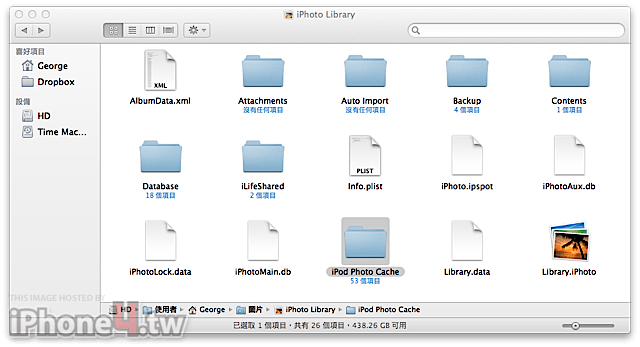
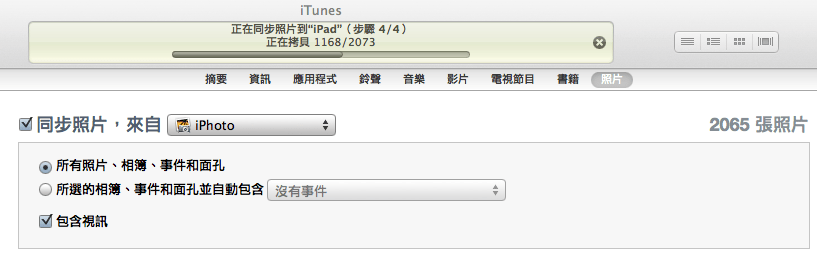
 我之前因為轉移關係遺失,把 iPod Photo Cache 目錄刪除,再重新同步試試看!