主題: iOS 5 GM發佈


顯示結果從 81 到 90 共計 124 條
-
10-06-2011 #81
請問已安裝 iOS5 GM 的 iPhone 4 可否用 iTunes 10.4作還原? 因為在Win 7 64位元裝了10.5B7無法開啟,想移除重裝10.4還原。
若移除iTunes會有什麼一併移除?app、music等等?
-
10-06-2011 #82Open Terminal
 作者: JasonZhang

Paste this string:
Go to ~/Music/iTunes/ (aka /user/[your user name]/Music/iTunes)代碼:sudo rm -fdr /Applications/iTunes.app
Rename your [iTunes Library.itl] to [iTunes Library.bak]
Then go into the folder "Previous iTunes Libraries"
There you will find a series of files with dates in their names the latest date was made when you upgraded your version of itunes and should have .itl on it while the others do not
copy it into the parent folder ~/Music/iTunes/ and rename it [iTunes Library.itl]
now run iTunes
Enjoy~
(Above for mac only)此篇文章於 10-06-2011 10:17 被 skyeysky 編輯。 原因: sorry,沒看到你是win系統
-
10-06-2011 #83
Thank you Mr.skyeysky.
大概了解,只有x64會這樣嗎?因為資料庫不相容而無法開啟?
希望哪位大大能翻譯一下,怕會錯意**
請問前面Open Terminal Paste this string這一段是?
-
10-06-2011 #84
For Mac only?
有Win7 x64的solution嗎?
-
10-06-2011 #85
好期待喔 等12號來下載
-
10-06-2011 #86可是我一樣是用Win7 64位元的耶 作者: JasonZhang
itunes可以正常使用喔!!
不過我是先把之前的itunes照官網的方式完全移除再灌B7就是了
-
10-06-2011 #87
有分32位元或是64的,但是64跑起來很不穩
以下使用方式引用tangoo
1.用iTunes備份iPhone
2.用tinyumbrella備份shsh以防後續想刷回4.x版
3.下載ios 5 gm & itunes B7
4.用TransMac提取ios 5成ipsw檔
5.進入recovery mode 後按shift (win) 點提取過後的ipsw回復
6.出現3194進WINDOWS>SYSTEM32>DRIVERS>ETC>HOST(用記事本開)
把XXX.XXX.XX.GS.APPLE.COM刪除後儲存
7.重開iTunes後再重複步驟五 即可完成
有遺漏的在請各位先進補上
-------------------------------------------
我建議是小紅傘在advanced-set hosts to cydia這個不要打勾
先設定好再進行升級,不然會出現3194
-
10-06-2011 #88
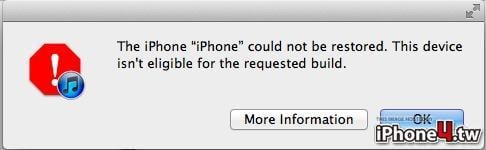
我也是出現這個畫面,與69樓樓主的作業環境是一模一樣的,請問有解嗎?
此篇文章於 10-06-2011 15:18 被 blingbling 編輯。
-
10-06-2011 #89
我Win7 64一切正常
-
10-06-2011 #90夥伴的英文ok嘛? 作者: taipeiari
下面這段嘗試一下
我自己也是遇到這個問題
In OSX it's located at /private/etc/hosts
The best way to edit the file here is run the following from the terminal app
sudo nano /private/etc/hosts
When it asks you for your password use the same on you use to log into the system.
Add a # before the 74.208.10.249 gs.apple.com
Press Control O to save, hit enter, and control X to exit the editor
內容截至 http://forums.macrumors.com/showthread.php?t=1148836
我自己是成功升上去了
Try it