


1.當您有備份過哪個韌體的shsh blobs,您就可以透過小雨傘或iTools刷回到哪個韌體版本.
2.沒有透過備份shsh blobs,目前技術只能重刷目前Apple提供的最新韌體.除非您停留韌體是可完美越獄,可透過iFaith對目前版本備份 shsh blobs.(韌體支援最高至4.3.3韌體備份;裝置不支援iPad2)
關於先前有越獄過,但因不小心升級4.3.5的用戶們,你們不用擔心,只要您曾經開起過Cydia,就會幫您自動備份shsh,如有4.3.3shsh,那恭喜你,你有回來4.3.3版本門票了.首先,教大家如何利用小雨傘從Cydia伺服器取得當初是否有幫您裝置備份.但不是每台iOS裝置,都會備份到,只能先試試看喔!
1.先下載下載小雨傘
http://thefirmwareumbrella.blogspot.com/
2.將iOS裝置連接USB線到電腦上,開啟小雨傘TU後,到進階勾選request shsh from cydia,點save shsh,如果還有4.3.3shsh,那就可以回去4.3.3.

小雨傘tinyumbrella推出5.10,解決備份5.0.1及5.1SHSH備份
Mac http://cache.firmwareumbrella.com/do...la-5.10.00.pkg
Wins http://cache.firmwareumbrella.com/downloads/tinyumbrella-5.10.00.exe
小雨傘tinyumbrella推出5.00.09更新版,解決iPad2 CDMA4.3.5降版問題

小雨傘tinyumbrella推出5.00.08更新版,解決4.3.5降版問題
Fix bugs
終於修復錯誤訊息1的問題,您可一次直接從4.3.5刷回4.3.3.
5.00.08
- iPad 2 GSM/CDMA will restore the currently signed baseband so 10xx errors won’t happen
(This will cease to work once apple stops signing the current 4.3.x firmware’s
baseband) - Optional iPhone 4 baseband update is now available to those that are officially unlocked. NOTE: iPhone baseband can ONLY be
restore/updated to a baseband that apple is currently signing. END OF STORY - Added 4.3.5, 4.3.4 support
- Fixed a nasty baseband request error for ipad 2 cdma
2. 更新iPhone 4 數據機韌體,現在對於鎖版iPhone4用戶已可免於升級.注意.iPhone 數據機韌體僅回復或更新到蘋果目前仍在發行的版本.一旦使用完小雨傘回復或更新後,就會回到原本的數據機韌體.
3.新增對4.3.5,4.3.4支援
4.修復iPad2 CDMA 數據機韌體的相關錯誤.

終於等到notcom大神家族旅行回來,修復先前5.00.07版本bugs問題.
讓您可一次刷回任何有使用小雨傘被份過的韌體.
Fix bugs:終於修復錯誤訊息1的問題,您可一次直接從4.3.5刷回4.3.3
TINYUMBRELLA (5.00.07)支援4.3.5及協助您IPHONE4基帶升級得以降版
4.3.5 Support AND Optional iPhone 4 Baseband Update
I'll probably regret this but this newest version of TU (5.00.07) will allow you to choose whether or not to update your iPhone 4's baseband. This new feature comes with a catch:
First, the version you WANT to restore to and the version Apple is currently signing must BOTH have the same baseband. This is important or else the baseband update will not work and you will get a 10xx error and need to use fixrecovery. (Works for iPhone 4 - will not work for iPad 2)
Second, you need to realize that checking the box WILL UPDATE YOUR BASEBAND.
Third, I'm working on a simple tool that will allow you to create a pseudo-custom firmware mixing a new baseband with an older iOS version (one that is jailbreakable for example).
This feature exists in the TinyUmbrella rewrite but does not yet exist in the older codebase. SORRY! I'm working on it!
I do not save your 'UPDATE iPHONE 4 BASEBAND' setting. If you wish to restore while updating/restoring your iPhone 4 baseband you must check that box every single time you run TinyUmbrella. It is just safer that way.
Also, iPad 2 users can still restore to 4.3.3 if they have their 4.3.3 SHSH. Just 'Start TSS Server' and then start up iTunes and restore your 4.3.3 ipsw. TinyUmbrella should help you restore without a 10xx error.
Enjoy!
未能及時更新對此感到抱歉,但最新版小雨傘5.00.07目前將仍允許你可選擇是否要升級您iPhone4基帶.相關更新說明如下:
1.首先,你想要回復版本必須與蘋果目前仍提供認證版本兩者要有相同基帶.這是很重要觀念或者當基帶不小心升級可能就無法運作且會發生10xx錯誤訊息,此時,你得需要使用fixrecovery跳出恢復模式.(目前適用iPhone4,但iPad2目前尚未支援)
2.次者,你需要理解一點,點選iTunes更新選項,一定會升級您的基帶.
3.再來,我目前正極力研究一個能讓你在舊iOS系統上搭載新基帶的自製韌體工具(例如.刷完即可達成越獄的韌體狀態).這功能其實存在於小雨傘下次運用上,但目前尚未完成,所以給大家使用小雨傘仍在舊編碼基礎上.抱歉我還在努力研發中.
小雨傘無法讓您保留在"新版iPhone4的基帶"設定功能.當您使用iTunes重刷您的iPhone4,請你最好每次連接USB後,使用小雨傘勾選升級iPhone4基帶(UPDATE iPhone4 BASEBABD).這是最保險方式.
而iPad 2 使用者仍可還原到4.3.3如果您有4.3.3SHSH.只要點選’Start TSS Server’ 及開啟iTunes並以手動方式回復選擇4.3.3韌體.小雨傘應該可以幫您還原且不會發生10xx錯誤.
更新基帶,這樣才能讓您降級時,基帶與韌體是相同,才不會又陷於recovery之中.
注意:適用機型
iPhone4/3GS/iPad1/iPad2 (GSM/CDMA)
假設您是iPhone4且使用小雨傘備份4.3.3shsh
----------------------------------
電腦作業系統 : win7
iTunes 版本 : 10.4
手機:iphone4
----------------------------------
1.假設您不小心升級iOS4.3.5

2.確認您有保存4.3.3SHSH

Windows系統(Windows NT/2000/XP)SHSH位置:C:\Documents and Settings\Administrator\.shsh
Windows系統(Vista/win7)SHSH位置:/User/使用者名稱/.shsh
Mac OS X系統SHSH位置: /User/使用者名稱/.shsh
3.關掉防火牆、及skype、msn、BT會用到網路埠80的軟體
(務必要關閉防毒軟體尤其是卡巴斯基)
4.下載最新版小雨傘 tinyumbrella-5.00.12 -- 官網 : http://thefirmwareumbrella.blogspot.com/
備註:如果為何無法開啟小雨傘?出現下面畫面?
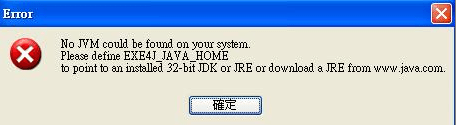
請到http://www.java.com 安裝java後才能執行小雨傘
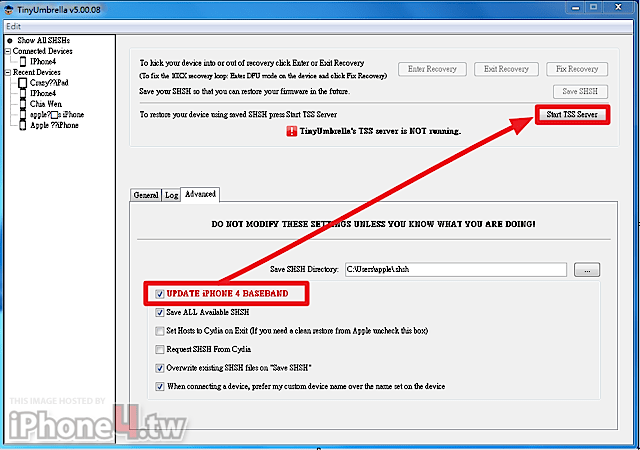
5.開啟小雨傘(5.00.08),點擊Connected Device->再點進階(Advanced)
(1)請取消第二個選項紅線框框的指向Cydia的設定取消,重新開啟小雨傘.
此作用是將Hosts中指向cydia的伺服器取消,即 74.208.10.249 gs.apple.com 前面加上# 74.208.10.249 gs.apple.com 表示忽略此作用的意思。 可避免降刷產生3194錯誤.即無法辨識您目前版本意思.

(2)勾選UPDATE iPHONE4 BASEBAND
出現警語,您是擁有非鎖版的iPhone4或者不擔心升級baseband的人,就點確定吧!

6.將iphone4進入DFU,點start tss server.
進入DFU mode (DFU模式)
• 連接您的裝置到電腦上.
• 將裝置關機 (方式:同時按Home+Power約4秒,上方出現移動滑桿來關機)
• 確認iTunes開啟,若無自動跳出,請自行開啟iTunes.
• 同時按住Power and Home 按鍵持續 10秒鐘.
• 放開Power 鍵但仍持續按住Home鍵,直到您的電腦出現找尋到新USB裝置後,再放開Home鍵.
• 此時手機螢幕,必須是全黑螢幕,才是成功進入DFU.若是失敗會重新開機,進入恢復模式,再回復時就可能會出現錯誤訊息20.
進入後要如何回到原先模式,請再次按著Power跟Home button ,重新開機即可.(若有設密碼與自動鎖鍵者請關閉喔!)
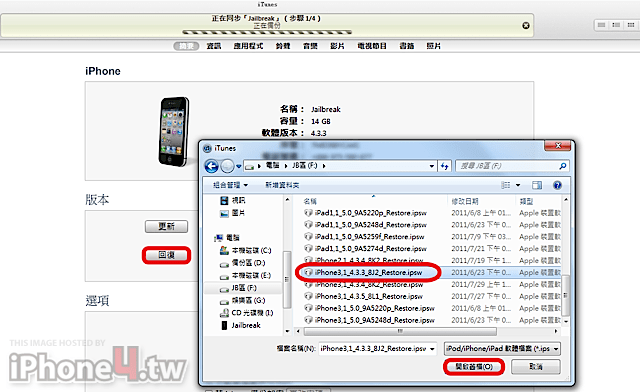
7.開啟iTunes,進行回復.(Windows使用者shift+回復;Mac使用者option+回復),選擇4.3.3韌體
8.iPhone4會出現解鎖畫面,點Unlock,輸入SIM密碼(如果您有設定)
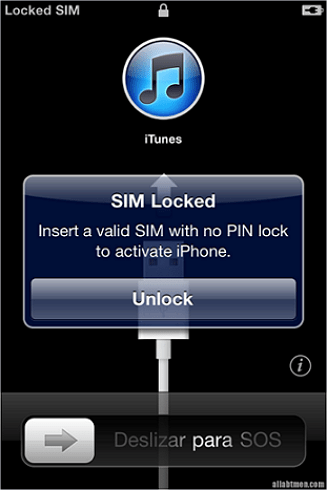
9.再來變成出撥打緊急電話
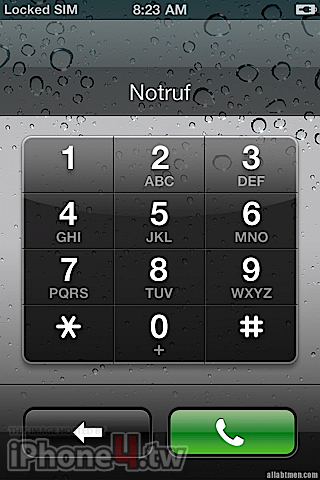
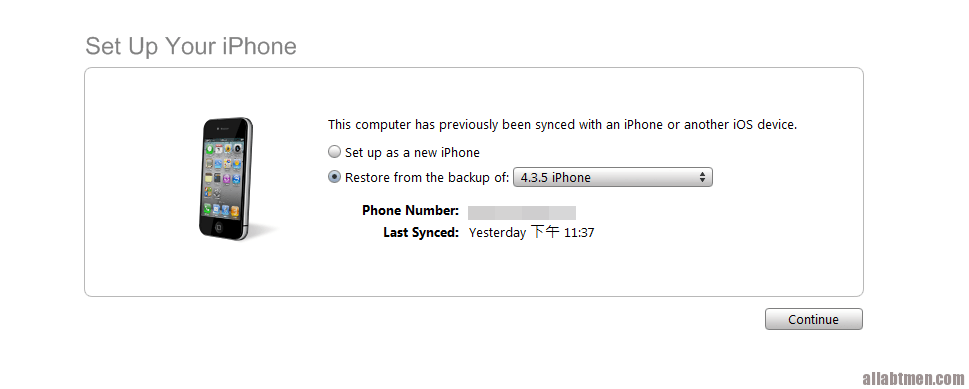
10.然後開啟iTunes後,自動將iPhone啟用(請先等待一會)
11.設定為新手機或從備份還原
這是大家最容易迷失的觀念: 是否當我備份要刷回版本的shsh,就一定可以回復?
引用 http://itools.hk/cms/?p=282
降級固件本身就不被蘋果官方認可,所以報錯幾乎是必然的,報錯的根本原因就是因為蘋果已不提供該版本固件的驗證了,致使基帶校驗無法通過,必須使用FixRecovery進行修復。目前有兩種方法給iTunes恢復固件提供虛擬的shsh驗證服務:一是通過修改hosts檔的功能變數名稱指向,用Cydia伺服器冒充蘋果的shsh驗證伺服器。二是使用Tiny umbrella在本地電腦上自建臨時的驗證伺服器,類比蘋果shsh驗證服務.
備份了shsh後是否就可以隨意恢復固件呢,理論上是這樣,但實際中會有很多問題,問題的關鍵在於基帶。一般情況下,不同版本的固件也分別對應著相應版本的基帶,恢復固件時首先是IOS系統寫入IOS寫入結束且校驗正確後,才開始往iPhone寫基帶,由於基帶是在系統固件之後寫入設備,且基帶有著更為苛刻嚴格的驗證機制(目前不可能破解),所以基帶是不可降級的。如果你升級了新版本的固件,並且隨之升級了基帶版本,那麼降級固件時基帶仍然會保留在那個高版本,這就導致了基帶與固件版本不對應,而基帶和固件版本之間不相符的話(保留基帶升級固件同樣也有基帶和固件版本不相符的問題),往往會有很多問題,如:搜索信號慢、信號不穩定、資料網路掉線GPS故障等等
備份了shsh後是否就可以隨意恢復固件呢,理論上是這樣,但實際中會有很多問題,問題的關鍵在於基帶。一般情況下,不同版本的固件也分別對應著相應版本的基帶,恢復固件時首先是IOS系統寫入IOS寫入結束且校驗正確後,才開始往iPhone寫基帶,由於基帶是在系統固件之後寫入設備,且基帶有著更為苛刻嚴格的驗證機制(目前不可能破解),所以基帶是不可降級的。如果你升級了新版本的固件,並且隨之升級了基帶版本,那麼降級固件時基帶仍然會保留在那個高版本,這就導致了基帶與固件版本不對應,而基帶和固件版本之間不相符的話(保留基帶升級固件同樣也有基帶和固件版本不相符的問題),往往會有很多問題,如:搜索信號慢、信號不穩定、資料網路掉線GPS故障等等
到這裡為止,我們開始討論各種錯誤訊息發生的可能性提出說明
錯誤訊息: 回復過程中出現錯誤訊息20 ?

教您解決錯誤20訊息,且降版到4.3.3.
------>可能是hosts搞得問題 < ------
現在情況您應該處於4.3.4,任你怎麼用小雨傘刷回4.3.3,一樣出現20錯誤.這下請跟我下面這樣做
1.將host使用記事本開啟,改成原始預設hosts(如下方),並切記再次重新開機.
# Copyright (c) 1993-1999 Microsoft Corp.
#
# This is a sample HOSTS file used by Microsoft TCP/IP for Windows.
#
# This file contains the mappings of IP addresses to host names. Each
# entry should be kept on an individual line. The IP address should
# be placed in the first column followed by the corresponding host name.
# The IP address and the host name should be separated by at least one
# space.
#
# Additionally, comments (such as these) may be inserted on individual
# lines or following the machine name denoted by a '#' symbol.
#
# For example:
#
# 102.54.94.97 rhino.acme.com # source server
# 38.25.63.10 x.acme.com # x client host
127.0.0.1 localhost
#
# This is a sample HOSTS file used by Microsoft TCP/IP for Windows.
#
# This file contains the mappings of IP addresses to host names. Each
# entry should be kept on an individual line. The IP address should
# be placed in the first column followed by the corresponding host name.
# The IP address and the host name should be separated by at least one
# space.
#
# Additionally, comments (such as these) may be inserted on individual
# lines or following the machine name denoted by a '#' symbol.
#
# For example:
#
# 102.54.94.97 rhino.acme.com # source server
# 38.25.63.10 x.acme.com # x client host
127.0.0.1 localhost
2.再次開啟小雨傘,將您的手機進入DFU模式,再點選start tss server.(參考上方圖示教學)
如果你去原本hosts路徑查看,已經將hosts改成下面.
# Copyright (c) 1993-1999 Microsoft Corp.
# This is a sample HOSTS file used by Microsoft TCP/IP for Windows.
#
# This file contains the mappings of IP addresses to host names. Each
# entry should be kept on an individual line. The IP address should
# be placed in the first column followed by the corresponding host name.
# The IP address and the host name should be separated by at least one
# space.
#
# Additionally, comments (such as these) may be inserted on individual
# lines or following the machine name denoted by a '#' symbol.
#
# For example:
#
# 102.54.94.97 rhino.acme.com # source server
# 38.25.63.10 x.acme.com # x client host
127.0.0.1 localhost
#74.208.10.249 gs.apple.com
127.0.0.1 gs.apple.com
# This is a sample HOSTS file used by Microsoft TCP/IP for Windows.
#
# This file contains the mappings of IP addresses to host names. Each
# entry should be kept on an individual line. The IP address should
# be placed in the first column followed by the corresponding host name.
# The IP address and the host name should be separated by at least one
# space.
#
# Additionally, comments (such as these) may be inserted on individual
# lines or following the machine name denoted by a '#' symbol.
#
# For example:
#
# 102.54.94.97 rhino.acme.com # source server
# 38.25.63.10 x.acme.com # x client host
127.0.0.1 localhost
#74.208.10.249 gs.apple.com
127.0.0.1 gs.apple.com
3.開啟iTunes,手動回復4.3.3,如果你是Windows者,請按住shift+回復;Mac使用者,請按住option+回復

4.最後完成.

錯誤訊息: 回復過程中出現錯誤訊息1013且手機卡在恢復模式 ?

錯誤訊息: 回復過程中出現錯誤訊息1015且手機卡在恢復模式 ?

錯誤訊息: 回復過程中出現錯誤訊息1 且手機卡在恢復模式 ?

錯誤訊息: 回復過程中出現錯誤訊息3194?
答:就是在刷機時iTunes驗證無法收到正確的SHSH出現的錯誤

1013/1015/1/3194錯誤訊息若是因為小雨傘降版產生,且手機卡在USB連接iTunes畫面的恢復模式下,皆可使用此方式.
依照下面步驟處理:
一、請先下載需要工具
* 跳出recovery mode loop 的工具:下方請依您版本選擇(for Osx or Win)
1.Fix Recovery [Windows] : fixrecovery4.3
2.Fix Recovery [OSX] : fixrecovery4.3
二、修改hosts
1.按下windows鍵+R後,跳出視窗貼上C:\Windows\System32\drivers\etc\
2.請用筆記本打開修改hosts
# Copyright (c) 1993-1999 Microsoft Corp.
#
# This is a sample HOSTS file used by Microsoft TCP/IP for Windows.
#
# This file contains the mappings of IP addresses to host names. Each
# entry should be kept on an individual line. The IP address should
# be placed in the first column followed by the corresponding host name.
# The IP address and the host name should be separated by at least one
# space.
#
# Additionally, comments (such as these) may be inserted on individual
# lines or following the machine name denoted by a '#' symbol.
#
# For example:
#
# 102.54.94.97 rhino.acme.com # source server
# 38.25.63.10 x.acme.com # x client host
127.0.0.1 localhost
#
# This is a sample HOSTS file used by Microsoft TCP/IP for Windows.
#
# This file contains the mappings of IP addresses to host names. Each
# entry should be kept on an individual line. The IP address should
# be placed in the first column followed by the corresponding host name.
# The IP address and the host name should be separated by at least one
# space.
#
# Additionally, comments (such as these) may be inserted on individual
# lines or following the machine name denoted by a '#' symbol.
#
# For example:
#
# 102.54.94.97 rhino.acme.com # source server
# 38.25.63.10 x.acme.com # x client host
127.0.0.1 localhost
三、您目前手機狀況
出現未知的錯誤(1013/1015/1/3194)訊息時,手機應如下圖,USB連iTunes畫面(recovery mode).

四、請確認手機連接電腦,先關閉小雨傘及iTunes.再來將您的iPhone 進入DFU ,請參照下方
‧ 同時按住Power and Home 按鍵持續 10秒鐘.
‧ 放開Power 鍵但仍持續按住Home鍵,直到您的iPhone螢幕出現黑色螢幕狀態,再放開Home鍵.
五、關閉iTunes,後再重新開啟
六、執行fixrecovery4.3後,iTunes會被關閉,這是正常.
1.在您執行fixrecovery4.3前,先確認兩件事:
(1)裝置已進入DFU(若是恢復模式會失敗)
(2)執行前iTunes是開啟狀態下.
2.將下面libusb0.dll 及zlib1.dll 下載後並與fixrecovery4.3放在相同資料夾,再執行fixrecovery4.3。
libusb0.dll 檔案 http://www.multiupload.com/A1WU3WOSG4
zlib1.dll 檔案 http://www.multiupload.com/8G3KJKGOFO
3.如果您執行fixrecovery4.3出現找不到itunehelper.exe,請先關閉iTunes,並在iTunes圖示上,按滑鼠右鍵,開啟檔案位置,您可發現itunehelper.exe,執行itunehelper.exe後,會自動開啟iTunes,請再次執行fixrecovery4.3,這樣才不會失敗喔!


Mac畫面下

執行過程中,電腦會跳出如同下方視窗,最後會出現Exiting libpois0n logout

windows

執行過程中,電腦會跳出如同下方視窗,最後會出現Exiting libpois0n logout

iPhone畫面則是會出現,如同綠毒越獄一般運行,最後會幫您重新開機.

七、iPhone會跳出撥打緊急電話,然後重新開啟iTunes後,拔除USB後再接上線即可讓手機恢復正常
錯誤訊息: 回復過程中出現錯誤訊息1603?
答:尚未遇過,請先參考此網路文章
iTunes恢复更新iPhone/iPad固件发生未知错误1603的原因及解决方法(图)
本文转自三好手机平板技巧,原文地址:http://www.3haow.com/1ios-iphone/201103/179.html
錯誤訊息: 回復過程中出現錯誤訊息1601或1602?
方法1
開啟Terminal Services/Telnet服務後,確定您刷機的韌體下載無誤,最後進入DFU,開啟小雨傘,點Start Tss server ,開啟iTunes,選擇4.3.3再刷一次吧 !
如果你是Win7
1.開啟Terminal Services服務:在Windows 7中變成了Remote Desktop Services
開始-控制台-系統及安全性-允許遠端存取-勾選第二選項(記得刷完要勾回原本第一個)
2.開啟Telnet服務
開始-控制台-程式集-程式與功能-開啟或關閉Windows功能-勾選Telnet伺服器及用戶端
3. 開啟Messenger服務
在Windows 7/Server 2008 R2裏都去掉了
如果你是WinXP
1.開啟Terminal Services服務
開始-控制台-系統管理工具-服務-找到Terminal Services-滑鼠右鍵-啟動
2.開啟Telnet服務
開始-控制台-系統管理工具-服務-找到Telnet-滑鼠右鍵-啟動
3. 開啟Messenger服務
因為這個服務有幾個依存關係的服務~只有先打開他們~才能打開MESSENGER~
分別是依存關係:NetBIOS Interface、Plug and Play、Remote Procedure Call(RPC)、Workstation
依照上訴方法~打開這幾個~就可以順利的打開MESSENGER了~
但是基於安全性~刷好了機器就關了吧~
方法2
換台電腦測試,16xx錯誤,可能跟您安裝作業系統有關係,因為現在很多都非正版,都是安裝別人自做精簡版或是黃金版作業系統,把一些內建程式給刪除....
遇到這問題,您一定要先手動進入dfu模式,在使用fixrecovery跳出.


 作者: fox6212



