


誤打正著看到這篇文章
跟著文章的教學,5.1.1也是JB成功,雖然是半JB,但是也很夠了!
不曉得是不是大家都知道,還是*"*
因為在板上沒看到有人貼這消息!
原文網址:點我連結
以下轉貼:
雖然 iOS 5.1.1 才剛剛發佈,但據國外的訊息指出仍可使用 iOS 5.1 的 Jailbreak 程式進行破解(沒有捕到可 JB 的漏洞),而目前國外也已經有 iOS 5.1 的 Jailbreak 教學過程與下載點,不過這是「半 JB」的 JB 程式,完美 JB 還是要繼續等!想當白老鼠的同學可以先當前浪唷 (會不會死在沙灘上就不知道了,要試試看) ^^"
外電資訊:(資料來源)
Apple is clearly cracking the productivity whip in their iOS team offices and have wasted no time at all in producing and pushing out an update to their mobile operating system, taking thelatest version to 5.1.1. While the latest release might offer some additional features, standard bug fixes and security patches, it also serves to keep the jailbreak development teams on their toes by forcing them to push an update where appropriate for their tools.
We have tested and can confirm that current latest version of Redsn0w jailbreaking tool can be used to jailbreak Apple’s latest iOS offering tethered on A4 powered devices such as iPhone 4, iPad 1, iPod touch 4G and below, thus allowing you to have continued access to all of the benefits of a liberated iOS Device. This has also been confirmed by MuscleNerd of the iPhone Dev-Team. We are carrying on our tradition of being reliable when it comes to all things Apple and jailbreak, by bringing you a step by step method on jailbreaking your iPhone, iPad and iPod touch on iOS 5.1.1 using Redsn0w.
How to jailbreak iOS 5.1.1 using Redsn0w
Step 1: Download the latest version of the iPhone Dev Team’s Redsn0w tool for your operating system (Windows /Mac).(下載 JB 程式:Windows 版本 / 下載 Mac 版本).
Step 2: Not a requirement, but it is always good practice to connect the device to iTunes and perform a backup of the contents. Alternatively, users can opt to back up the device to iCloud if enabled.(將設備連結到 iTunes,並且先進行備份)
Step 3: After the backup is complete, upgrade the device’s firmware to iOS 5.1.1. Users can choose to either do this via an OTA update on the device, or by plugging the device onto your PC or Mac, firing up iTunes and accepting and installing the update, or by downloading the iOS 5.1.1 device-specific firmware file and doing a manual install through iTunes.(如果你之前的環境不是 iOS 5.1 的話,請先升級為 iOS 5.1.1,然後下個步驟在進行降級)
Step 4: Download the iOS 5.1 (not iOS 5.1.1) IPSW file that corresponds to the specific device you are using.(接著下載 iOS 5.1 的離線安裝檔,以便將環境回到 iOS 5.1 版,下載離線安裝檔點這裡:Download the iOS 5.1)
Step 5: Locate the Redsn0w download folder from Step 1, unzip the contents and run the executable file to launch Redsn0w.(接著請您開啟 Redsn0w JB 破解程式)
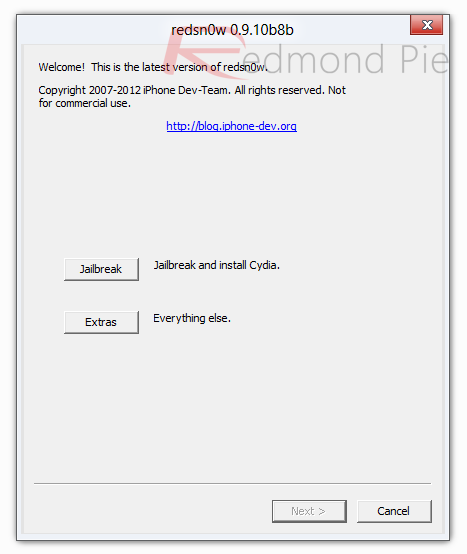
Step 6: Select ‘Extras’ on the Redsn0w GUI and the choose the ‘Select IPSW’ option.(選擇 Extras,然後再選 Select IPSW 選項,這是要讓您回到 iOS 5.1 的步驟)
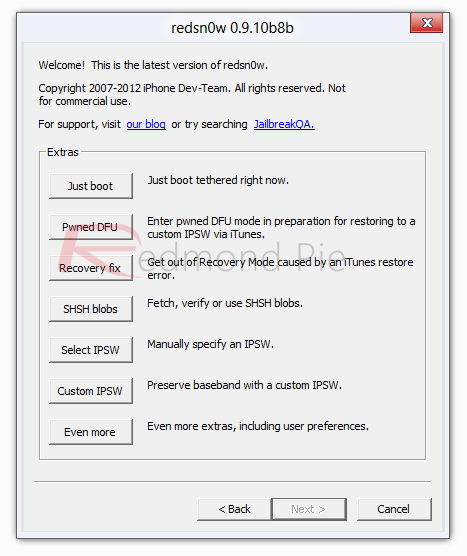
Step 7: When prompted, point to IPSW file from Step 4 (which is iOS 5.1) and select it.(選擇剛剛下載的 IPSW 離線安裝檔案,也就是 iOS 5.1 的離線安裝檔)
Step 8: On the main home screen of Redsn0w, select ‘Jailbreak’ and then make sure the ‘Install Cydia’ option is selected before proceeding.(完成以上動作之後,執行 Redsn0w 程式中的 Jailbreak 選項,即可完成越獄)
Step 9: The on-screen prompts will now walk you through the process to put the device into DFU mode. This is a requirement for the jailbreak process to be successful. Make sure to follow all steps carefully.(這邊是教您進入 DFU 模式來檢查,JB 過程中都順利的人可以跳過)
Step 10: When DFU mode is detected, Redsn0w will automate the rest of the process on-screen before finishing off on the device. During the process, it is entirely normal to see white lines of text scrolling down the device’s screen. When the device reboots, the jailbreak process is complete which should be evident by the presence of the Cydia icon on the home screen.
Since this is a tethered jailbreak, you will have to boot your device into tethered boot mode on every restart. You can do this by launching Redsn0w, select "Extras", then"Just Boot" in order to boot your device tethered.
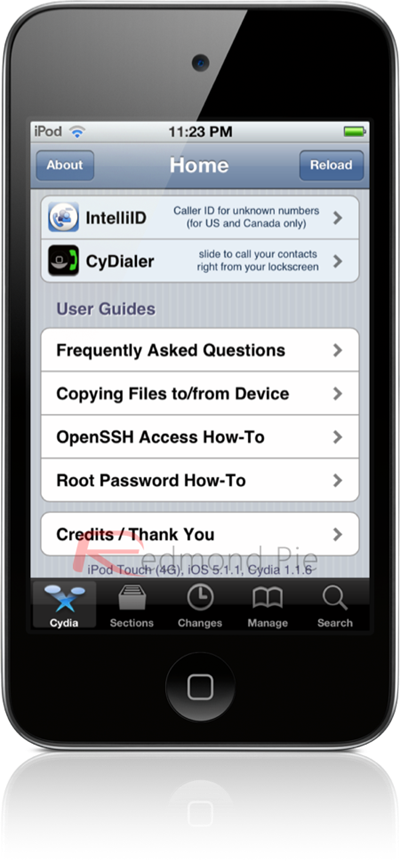
You are now free to feel extremely smug knowing that you are using a jailbroken device, even though Apple have tried their very best to prevent it. The setup process of Cydia is extremely easy, with on-screen prompts guiding users through the process. After the data is done reloading and the Cydia app restarts, it will be ready to use.
You can follow us on Twitter, add us to your circle on Google+ or like our Facebook page to keep yourself updated on all the latest from Microsoft, Google, Apple and the web.



